HRMex Reports Management
This section provides a detailed explanation of various Daily Attendance Reports generated by the HRMex system. These reports help administrators and HR personnel monitor employee attendance, work duration, overtime, and shift performance effectively. Each report serves a unique purpose, allowing better tracking and workforce management.
1 Daily Basic Work Duration Report
The Daily Basic Work Duration Report displays the total working hours, overtime, and attendance status for employees within a selected date range. It helps track employee presence and working duration on a daily basis.
Key Columns
- InTime / OutTime – The actual login and logout times.
- Work Dur. – Total working hours during the day.
- OT – Overtime hours worked.
- Tot. Dur. – Combined total of work duration and overtime.
- Status – Indicates whether the employee was Present, Absent, or on WOP (Weekly Off with Pay).

Figure 1.0: Daily Basic Work Duration Report Example
1.1 Daily Basic Present Report
Displays employees who were marked as 'Present' along with their working hours and shift details.
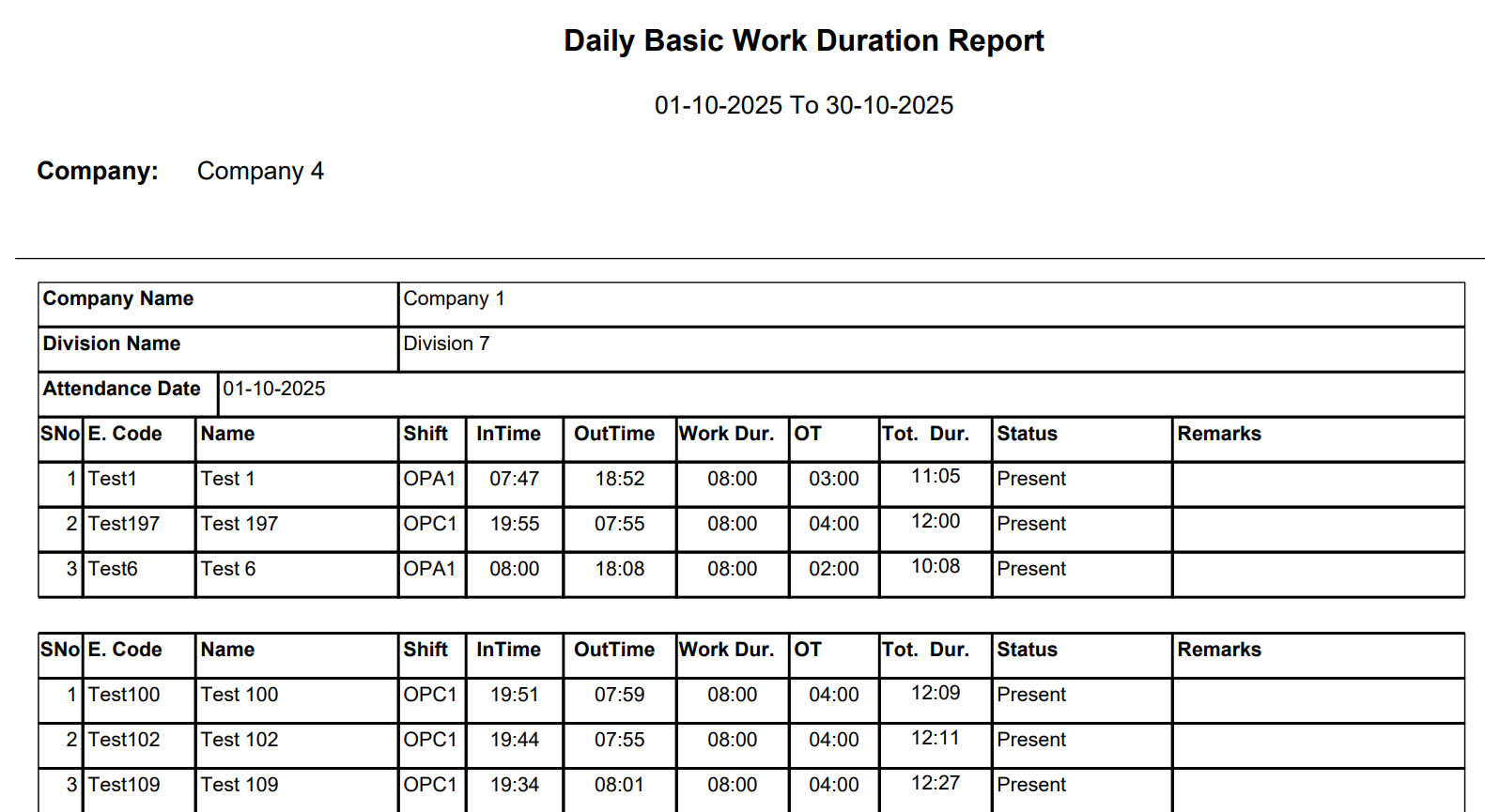
Figure 1.1: Daily Basic Present Report Example
1.2 Daily Basic Absent Report
Shows all employees who were absent for the selected date range, useful for attendance tracking and leave validation.

Figure 1.2: Daily Basic Absent Report Example
1.3 Daily Basic On Leave Report
Lists employees who were officially on leave, including leave types such as casual leave, sick leave, or annual leave.
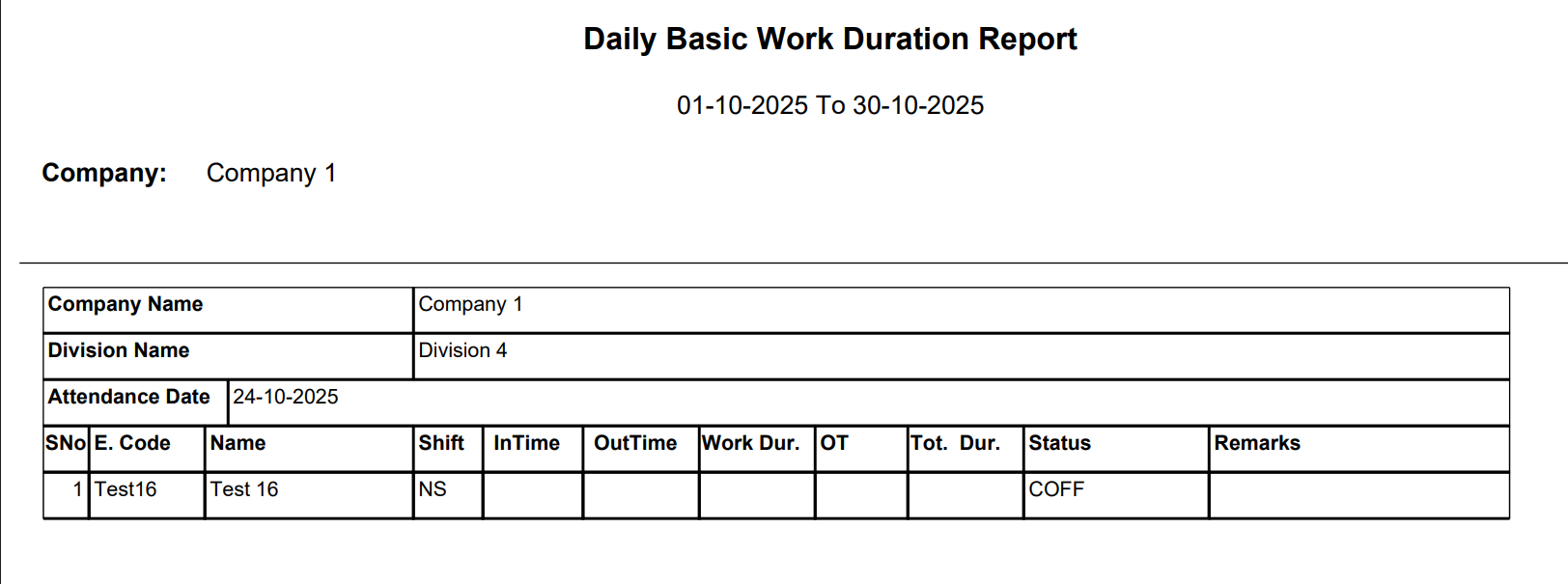
Figure 1.3: Daily Basic On Leave Report Example
1.4 Daily Basic Late Coming Report
Displays employees who reported late for duty compared to their assigned shift timings.
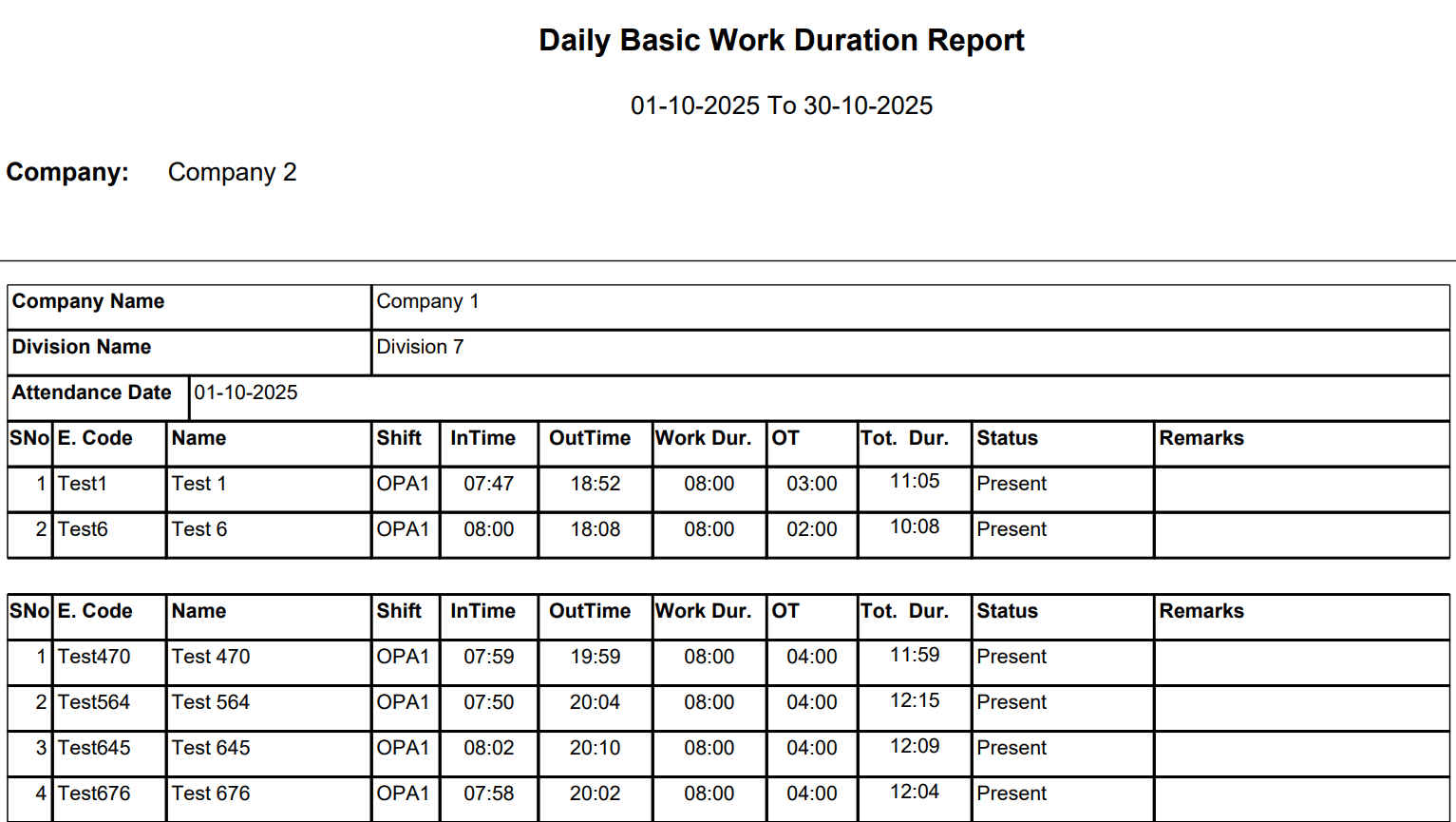
Figure 1.4: Daily Basic Late Coming Report Example
1.5 Daily Basic Early Going Report
Shows employees who left before their scheduled shift end time, helping HR track time discipline.
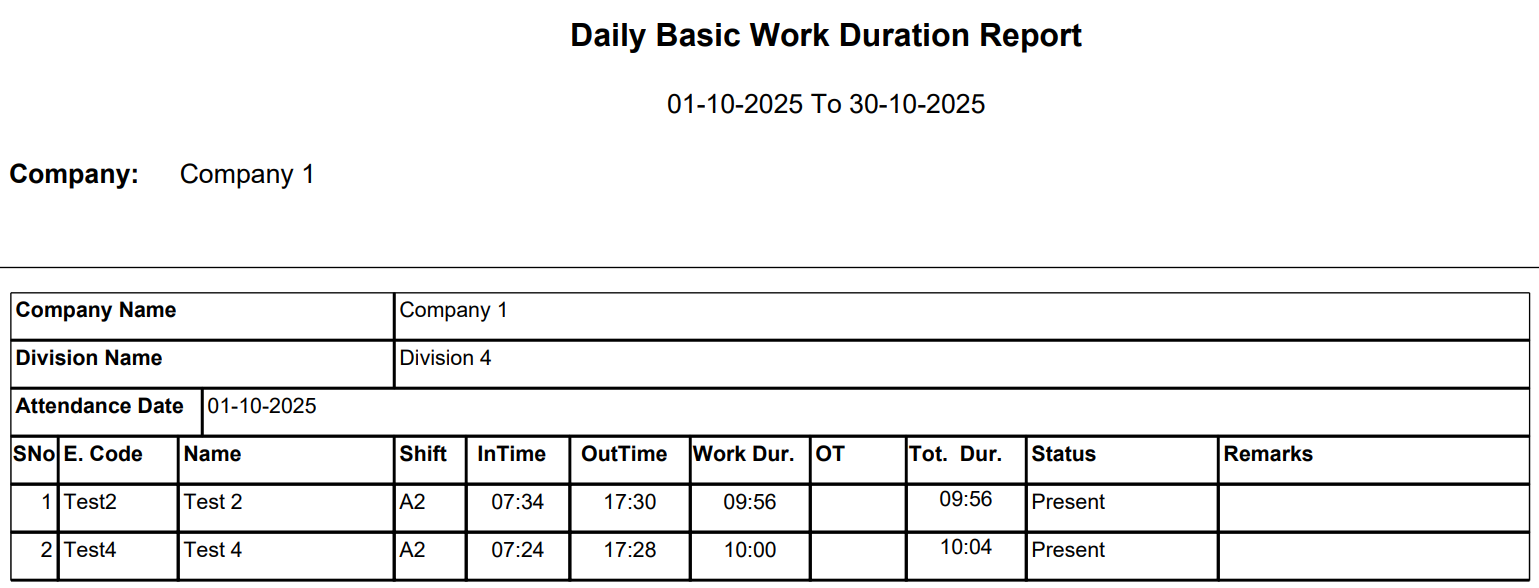
Figure 1.5: Daily Basic Early Going Report Example
1.6 Daily Basic Miss Punch Report
Highlights employees who missed a punch entry (either In-Time or Out-Time), allowing HR to verify attendance records manually.
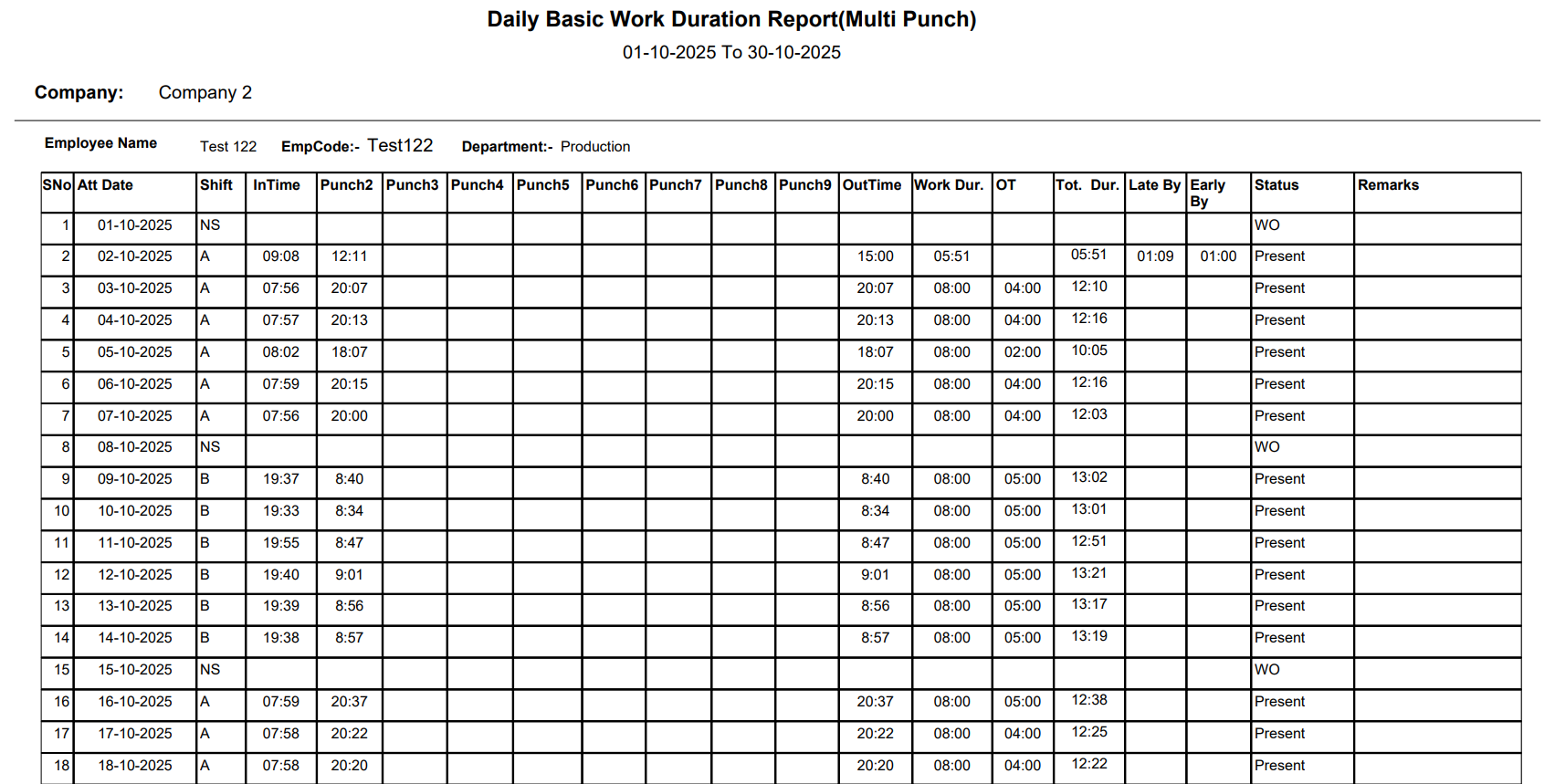
Figure 1.6: Daily Basic Miss Punch Report Example
2 Daily Basic Report (Detailed View)
This detailed report shows attendance data for all employees on a specific date. It includes shift details, scheduled and actual timings, lateness, and early departures. The report is useful for understanding punctuality and real-time performance.
Key Columns
- S. InTime / S. OutTime – Scheduled shift timings.
- A. InTime / A. OutTime – Actual recorded timings.
- LateBy / EarlyGoingBy – Indicates delay or early departure.
- Status Code – For example, P for Present, WO for Weekly Off, etc.
- Employee Status – Displays the working condition or leave type.
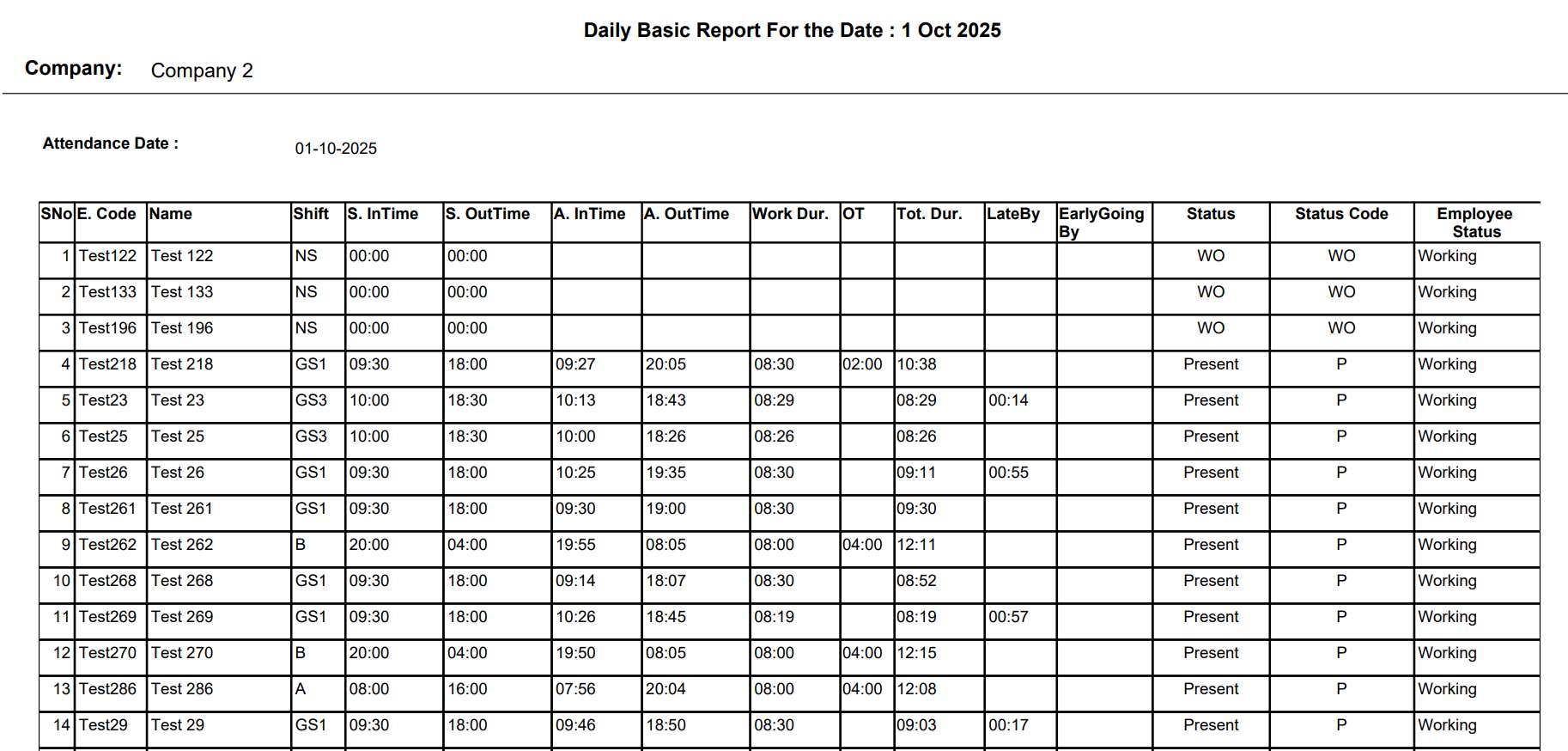
Figure 2.0: Daily Basic Report - Detailed View Example
3 Daily Basic Work Duration Report (Multi Punch)
The Multi Punch report provides a comprehensive view for employees who punch multiple times during the day. It records all entry and exit punches to calculate accurate working and overtime hours.
Key Columns
- Punch2 to Punch9 – Intermediate punches during the day.
- Work Dur. – Total effective working duration.
- OT – Total overtime calculated based on extra hours.
- Late By / Early By – Delays or early exits recorded.
- Status – Shows attendance type such as Present, WO, etc.
Figure 3.0: Daily Basic Work Duration Report - Multi Punch Example
4 Shift Wise Admin/HR Report
The Shift Wise Admin/HR Report displays attendance data based on departments, designations, and assigned shifts. It helps HR administrators analyze shift-based presence.
Key Columns
- Name and Designation – Identifies the employee and their role.
- Location – Assigned work location.
-
Attendance Columns – Includes codes such as:
- P – Present
- MP – Multi Punch
- AB – Absent
- SL – Sick Leave
- AL – Annual Leave
- P/M – Permission
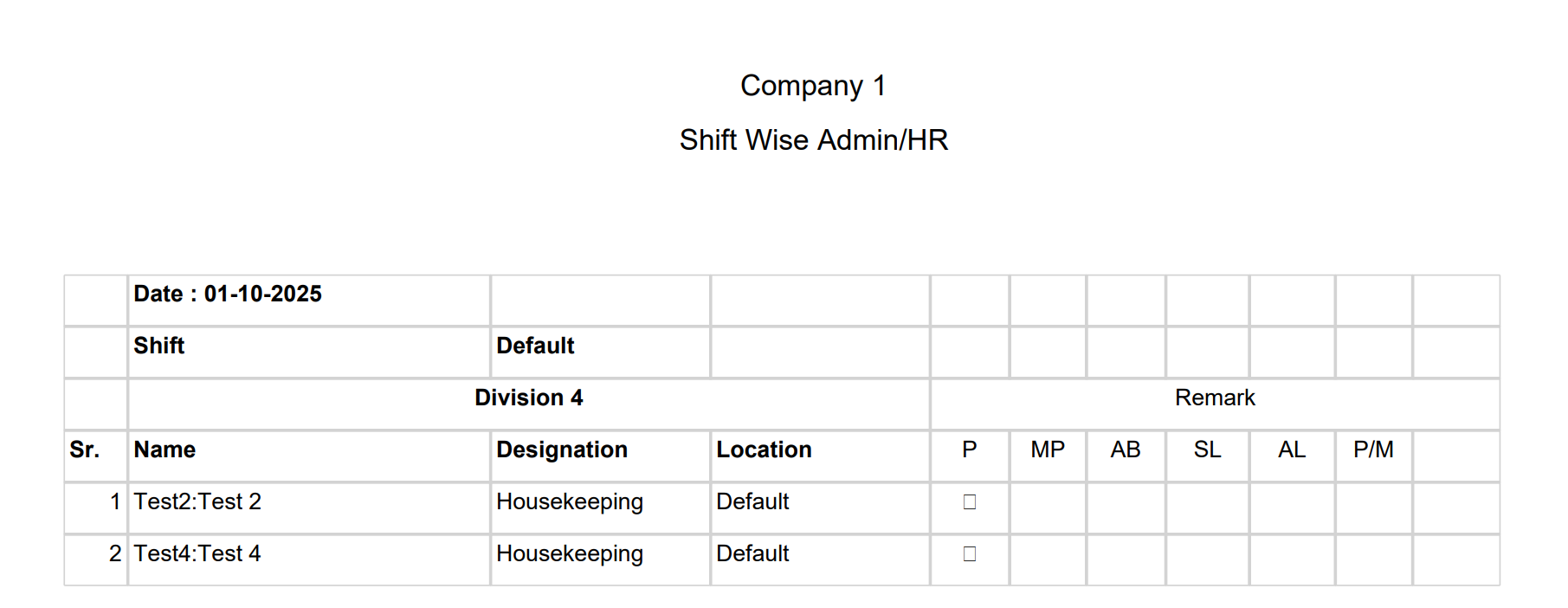
Figure 4.0: Shift Wise Admin/HR Report Example
This section provides a complete and beginner-friendly explanation of all Monthly Attendance Reports generated by the HRMex system. These reports help HR teams and management analyze attendance trends, working hours, overtime, and employee performance effectively. Each report is described in simple terms for easy understanding.
1 Monthly Attendance Report
Provides a daily record of attendance for each employee across the month. It includes Present, Absent, Leave, Weekly Off, and Holiday status along with In-Time and Out-Time details. Helps track consistency and absentee trends.

Monthly Attendance Report Example
2 Monthly Basic Report
Displays department-wise daily attendance status:
- P – Present
- A – Absent
- WO – Weekly Off
- H – Holiday
Useful for payroll and compliance with attendance registers.
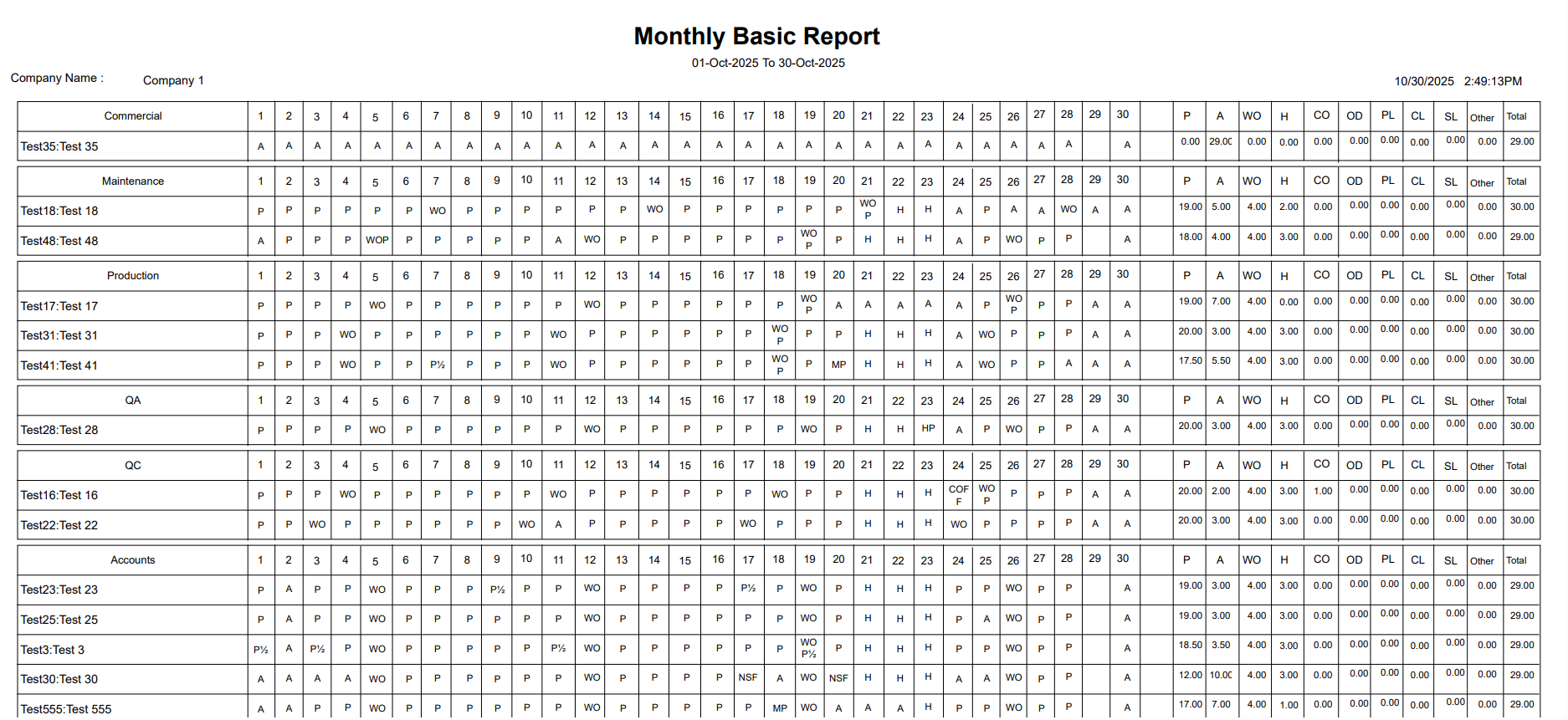
Monthly Basic Report Example
3 Monthly Detail Report
A complete detailed view of monthly attendance including:
- In-Time / Out-Time
- Work Duration
- Overtime (OT)
- Shift timings
Helps HR analyze punctuality and employee work patterns accurately.

Monthly Detail Report Example
4 Monthly In-Out Report
Provides precise In-Time and Out-Time for each working day. Also shows total Present days, Absent days, and Overtime hours.
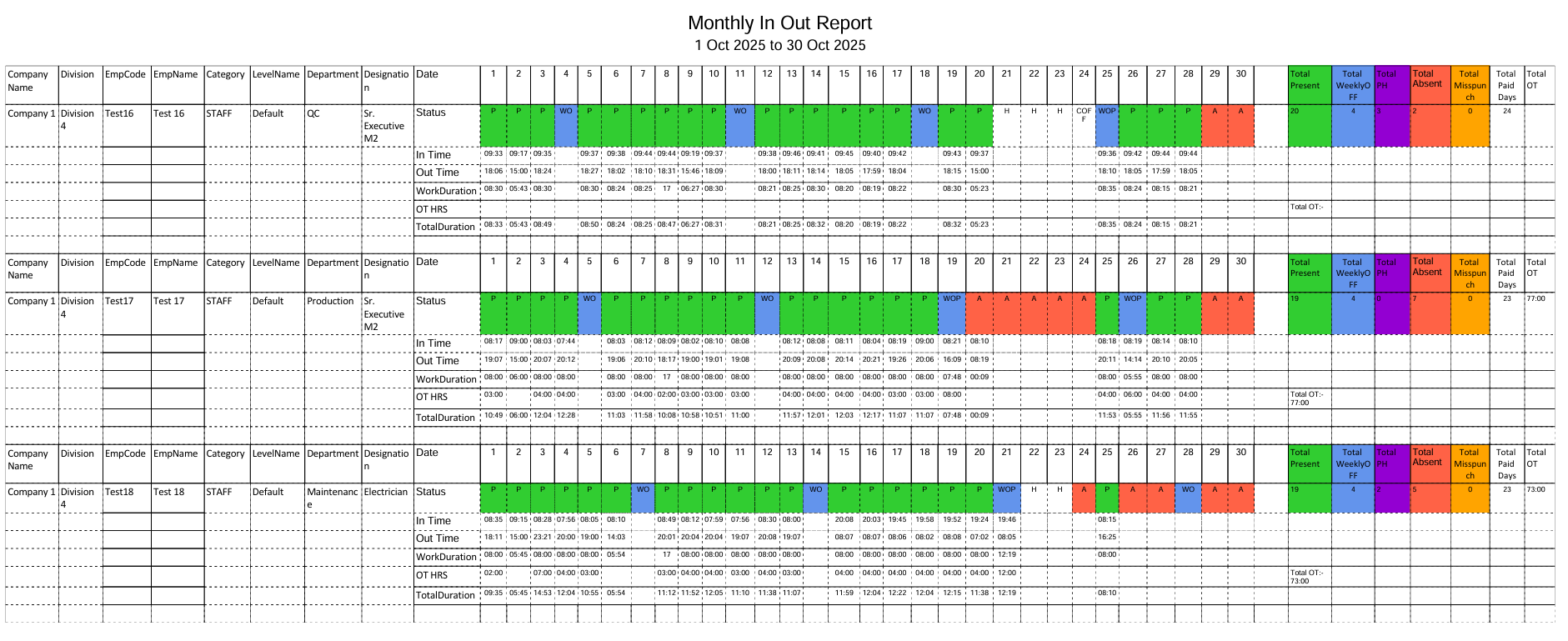
Monthly In-Out Report Example
5 Monthly OT Report
Summarizes daily overtime and calculates total monthly OT hours. Essential for overtime payment and production tracking.
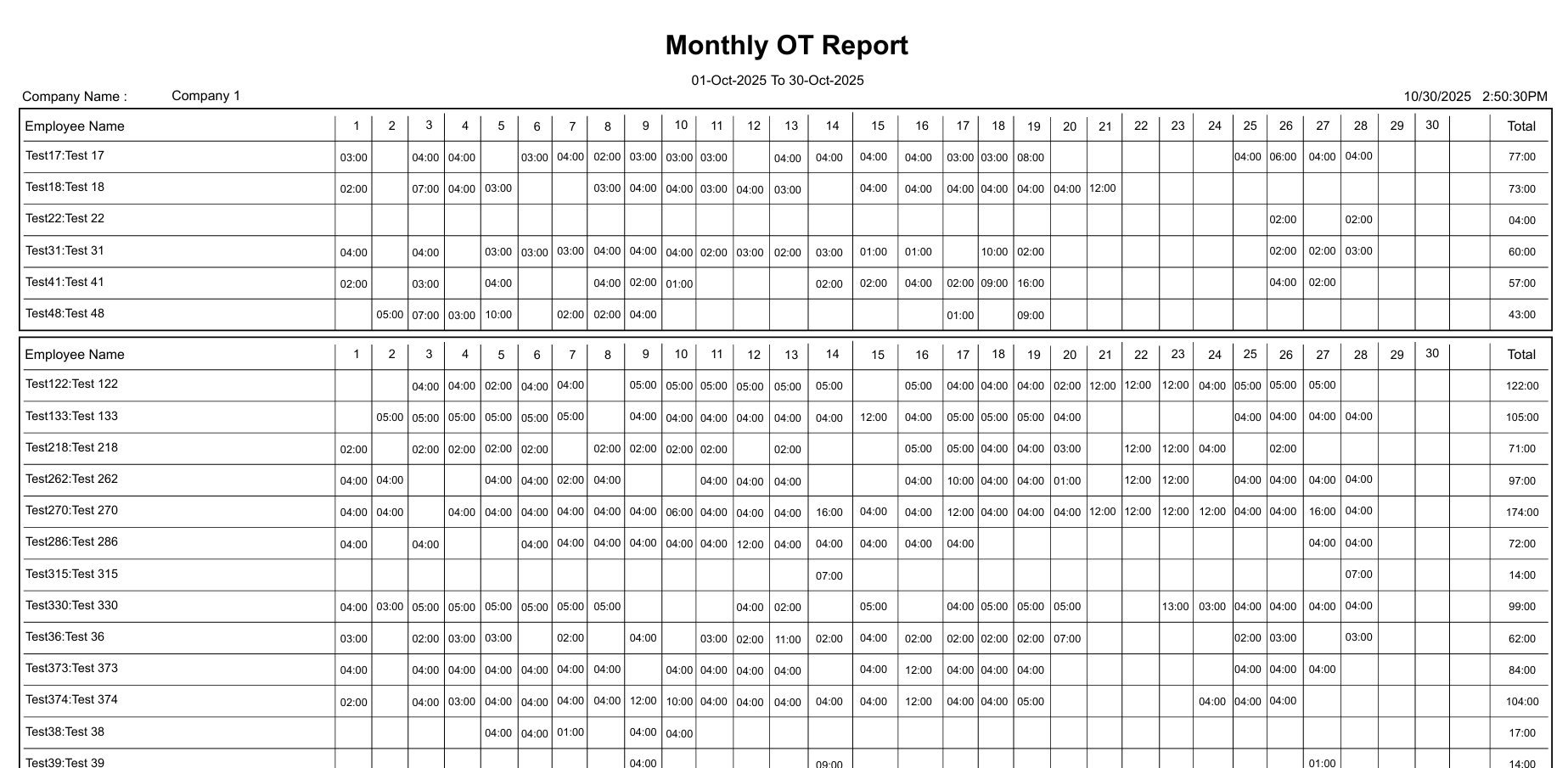
Monthly OT Report Example
6 Monthly Performance Report
Measures attendance discipline and overall performance based on:
- Daily presence
- Total duration
- Overtime patterns
Useful for performance evaluation and HR analytics.
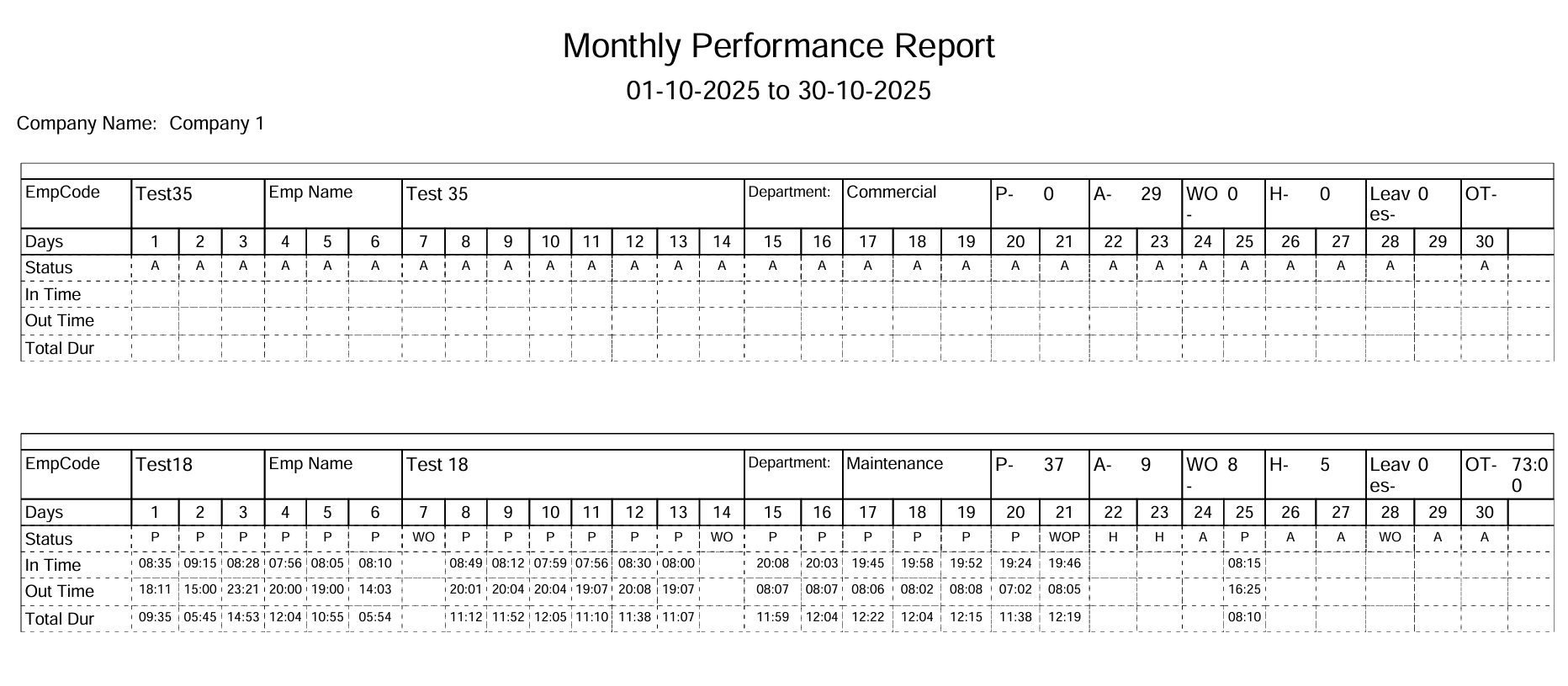
Monthly Performance Report Example
7 Monthly Status Report (Basic Report)
Provides department-wise monthly totals of:
- Presents
- Absents
- Holidays
- Payable Days
Offers a clear high-level summary of attendance status.

Monthly Status Report (Basic Report) Example
8 Monthly Summary Report
A concise monthly snapshot including:
- Total working days
- Total absences
- Holidays
- Overtime hours
Helps management review attendance trends quickly.
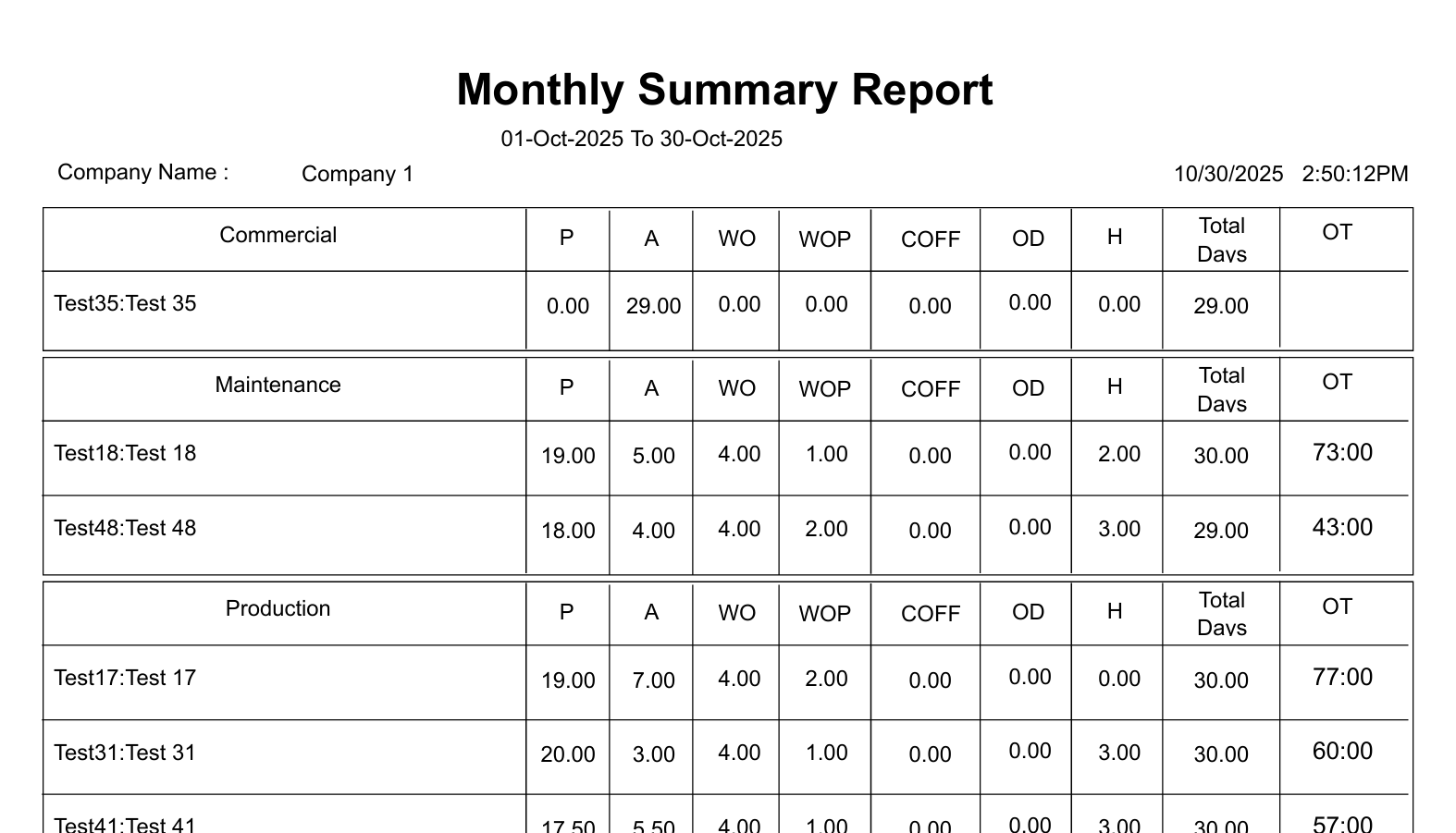
Monthly Summary Report Example
9 Monthly Work Duration Report
Shows total working hours for each day of the month. Helps HR ensure employees meet expected work duration.
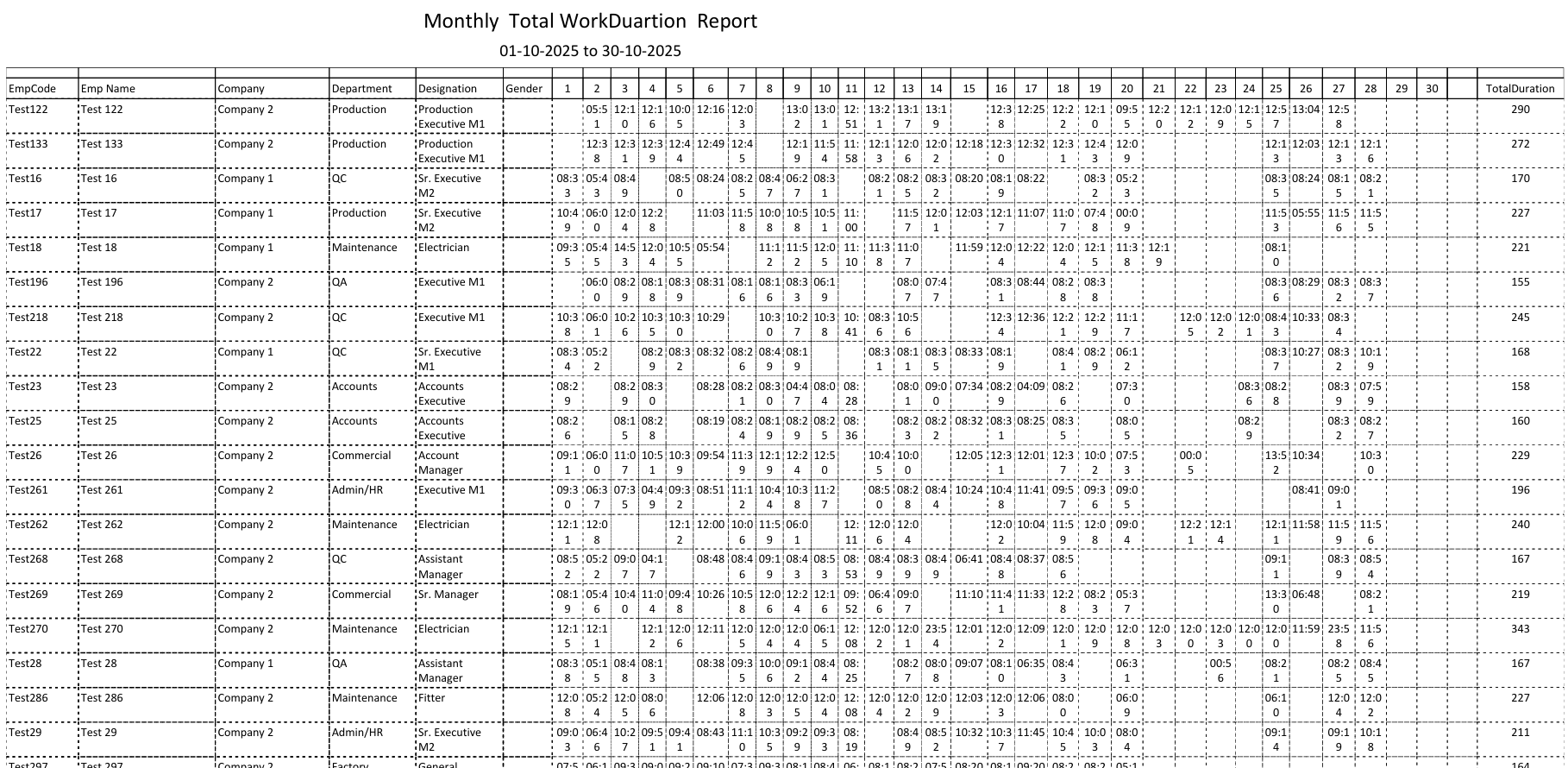
Monthly Work Duration Report Example
10 Monthly Basic with OT Report
Combines attendance and overtime data in a single report. Provides a complete view of:
- Daily attendance
- Work duration
- Extra working hours
Very useful for payroll accuracy and pattern analysis.
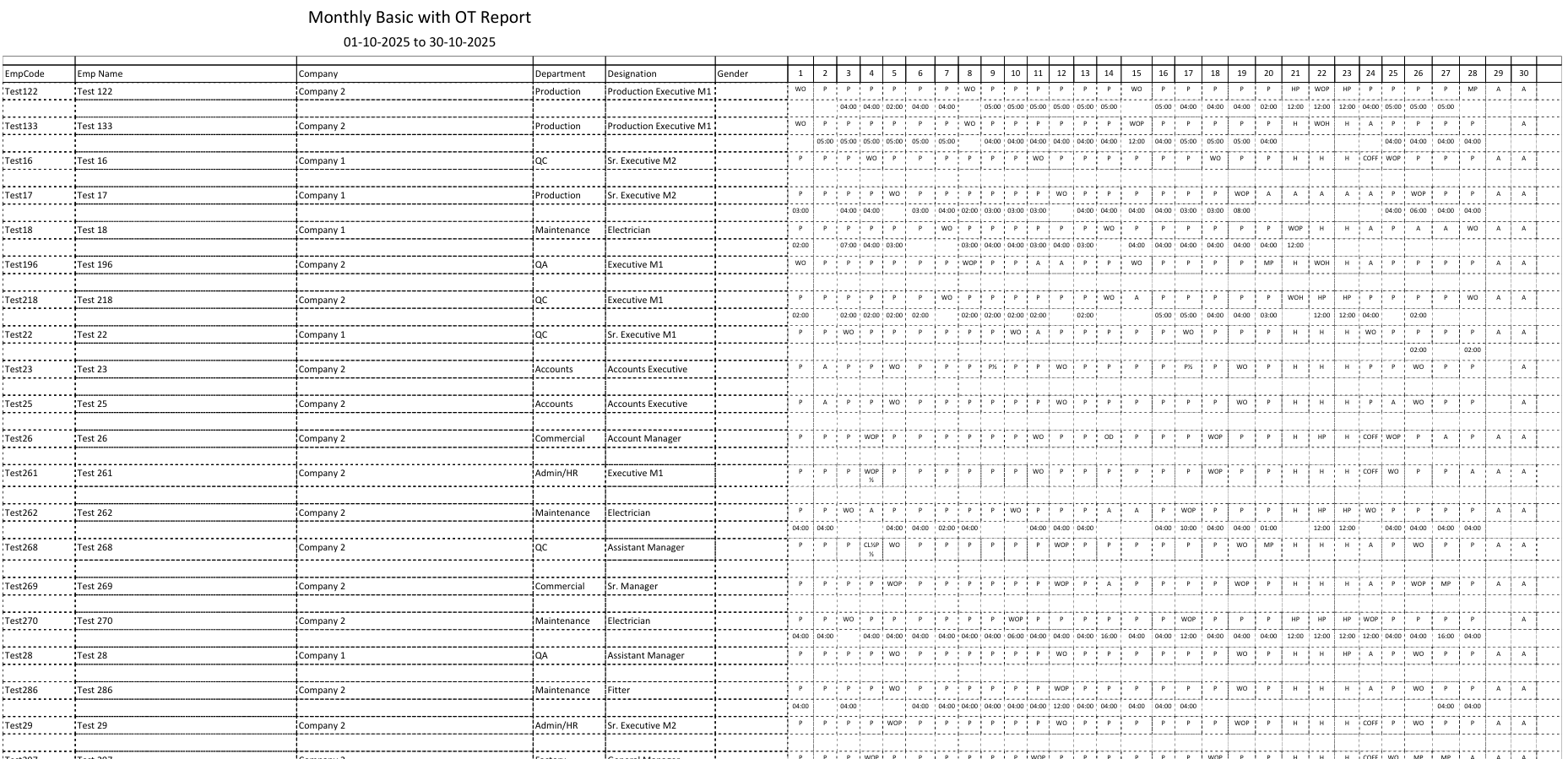
Monthly Basic with OT Report Example
11 Form1 Report
A comprehensive monthly attendance form that consolidates all key attendance metrics in a standardized format. This report includes:
- Employee details and department information
- Complete monthly attendance breakdown
- Working hours and overtime summary
- Leave and absence records
Form1 is particularly useful for official documentation, audits, and maintaining compliance with labor regulations. It provides a professional format suitable for both internal records and external reporting requirements.
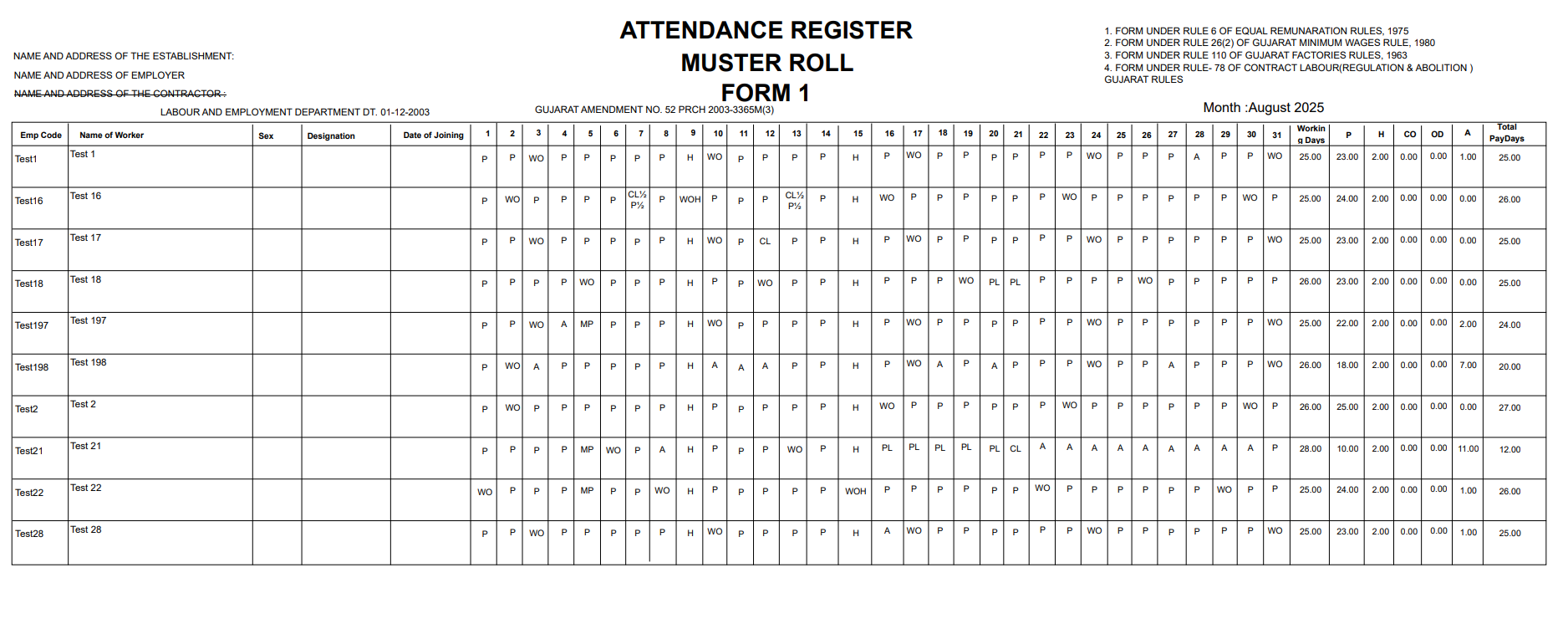
Form1 Report Example
This section explains all the Yearly Attendance Reports generated by the HRMex System. Each report provides a detailed summary of attendance, performance, and work duration over the year. The descriptions are beginner-friendly to help HR personnel understand their usage easily.
1 Yearly Performance Report
The Yearly Performance Report provides a month-by-month breakdown of employee attendance and work performance.
It displays:
- Daily attendance statuses (P – Present, A – Absent, WO – Weekly Off, CL – Casual Leave, etc.)
- In-Time and Out-Time for each workday
- Total Duration and daily working hours
This report helps HR teams analyze employee consistency, punctuality, lateness, and overtime patterns across the entire year.

Yearly Performance Report Example
2 Yearly Summary Report
The Yearly Summary Report presents a consolidated view of total monthly attendance values for each employee.
It shows yearly totals of:
- Present Days
- Absent Days
- Weekly Offs
- Holidays
- Leave Types (PL, CL, SL, etc.)
This report is useful for annual payroll processing, audits, and performance evaluations.
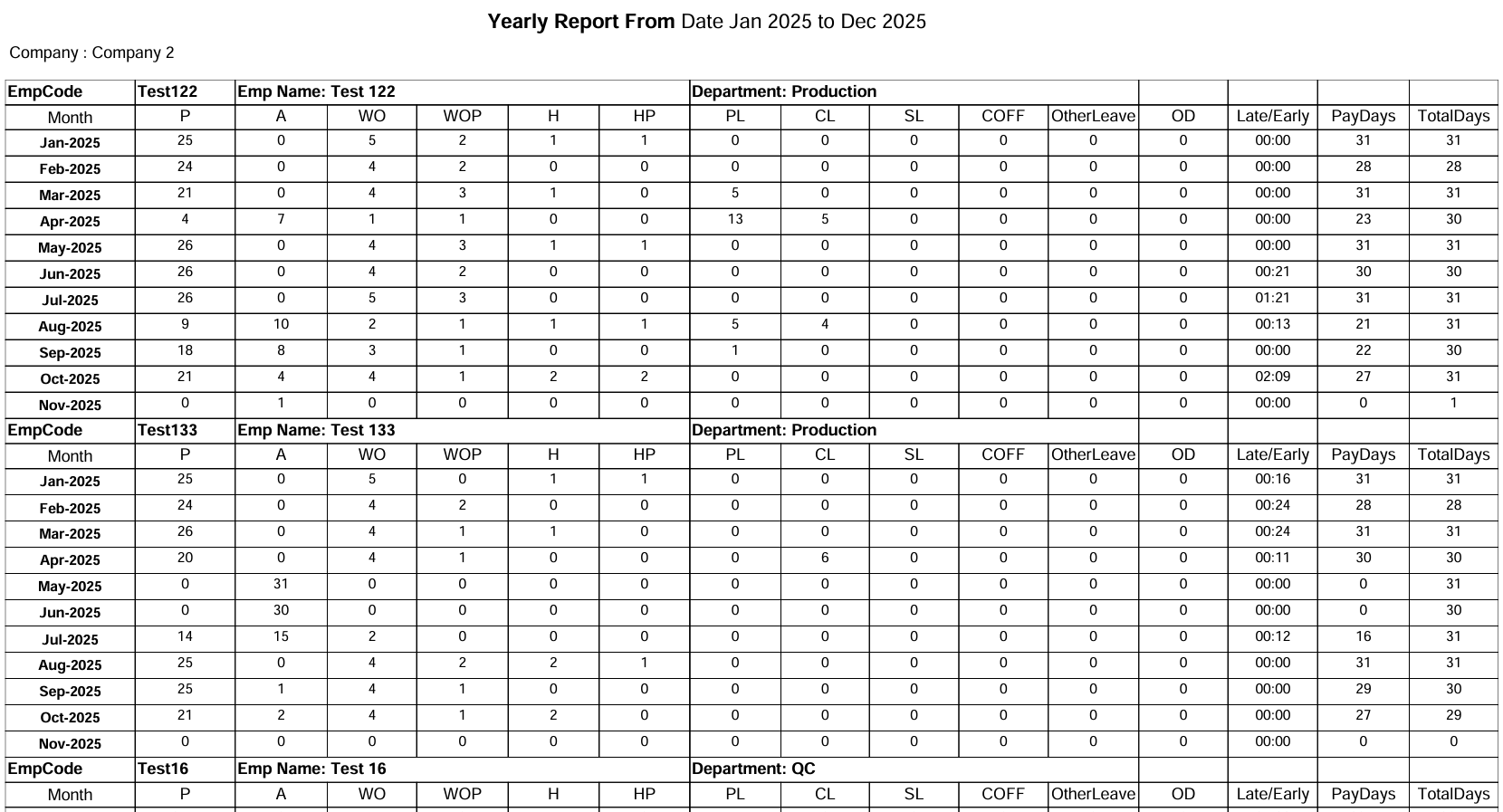
Yearly Summary Report Example
3 Performance Overview
By combining both the Yearly Performance Report and the Yearly Summary Report, HR teams can identify:
- Employees with excellent attendance records
- Workers showing inconsistent presence
- Patterns requiring improvement or coaching
This information supports year-end appraisal decisions, reward allocations, and corrective actions when needed.
4 Key Benefits of Yearly Reports
- Daily presence
- Total duration
- Overtime patterns
Useful for performance evaluation and HR analytics.
This section details the Payroll Reports available in the HRMex system. These reports are essential for salary processing, financial auditing, and ensuring accurate compensation management for all employees.
1 Salary Slip
The Salary Slip is a detailed monthly statement provided to employees. It includes a breakdown of earnings, deductions, and net pay.
Key Components
- Earnings: Basic Salary, HRA, DA, Allowances.
- Deductions: PF, ESI, Professional Tax, TDS.
- Net Pay: The final amount credited to the employee.
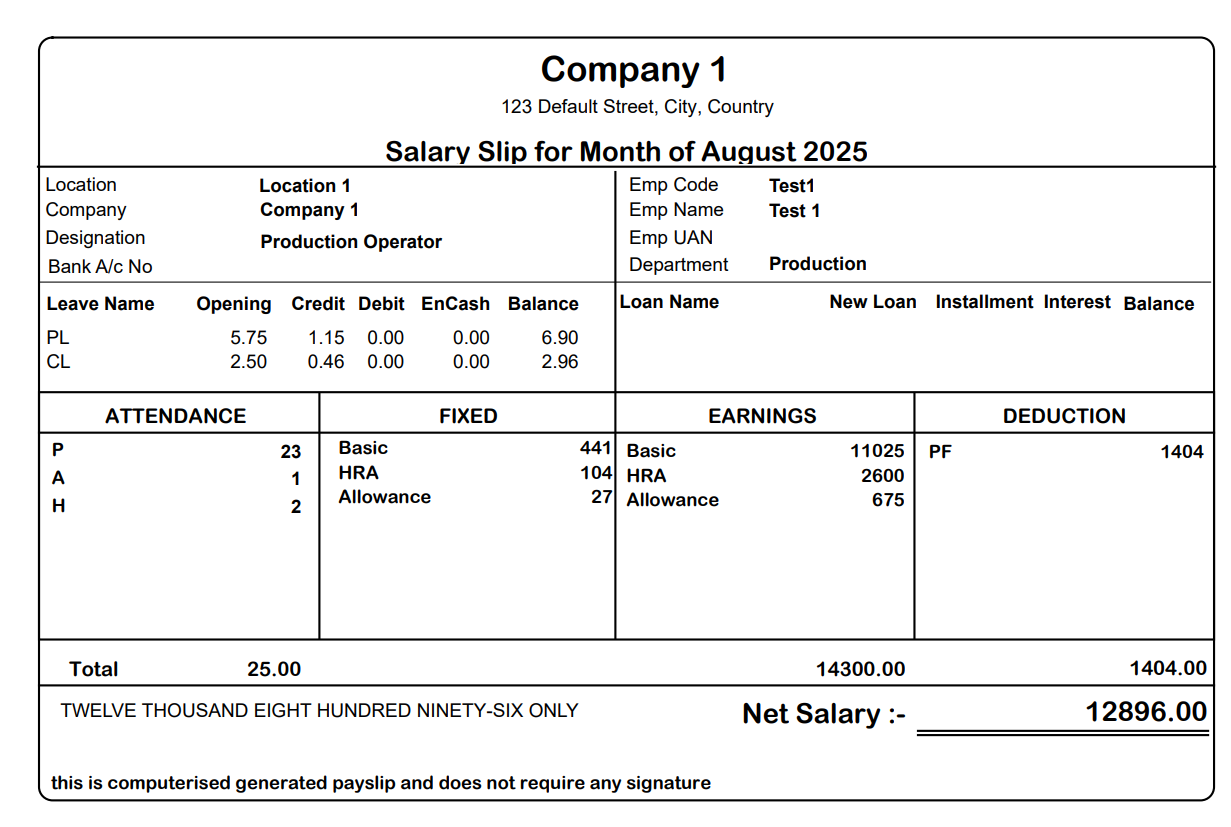
Figure 1.0: Salary Slip Example
2 Salary Statement Report
A comprehensive report listing the salary details of all employees for a specific month. It is used by HR and Finance teams for final payroll verification before disbursement.
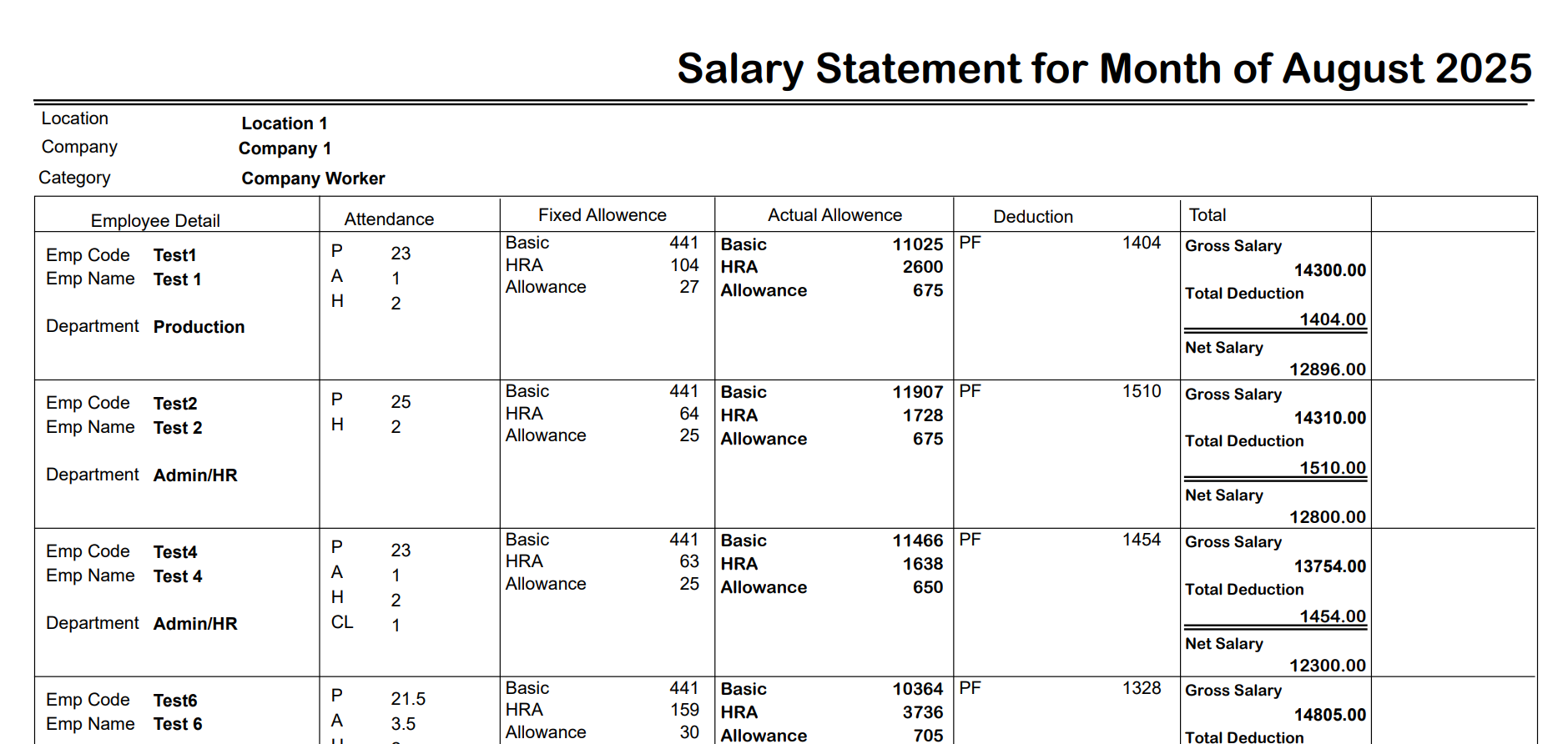
Figure 2.0: Salary Statement Report Example
3 Bank Statement
The Bank Statement report is generated for bank transfers. It contains employee bank account details and the net salary to be credited.
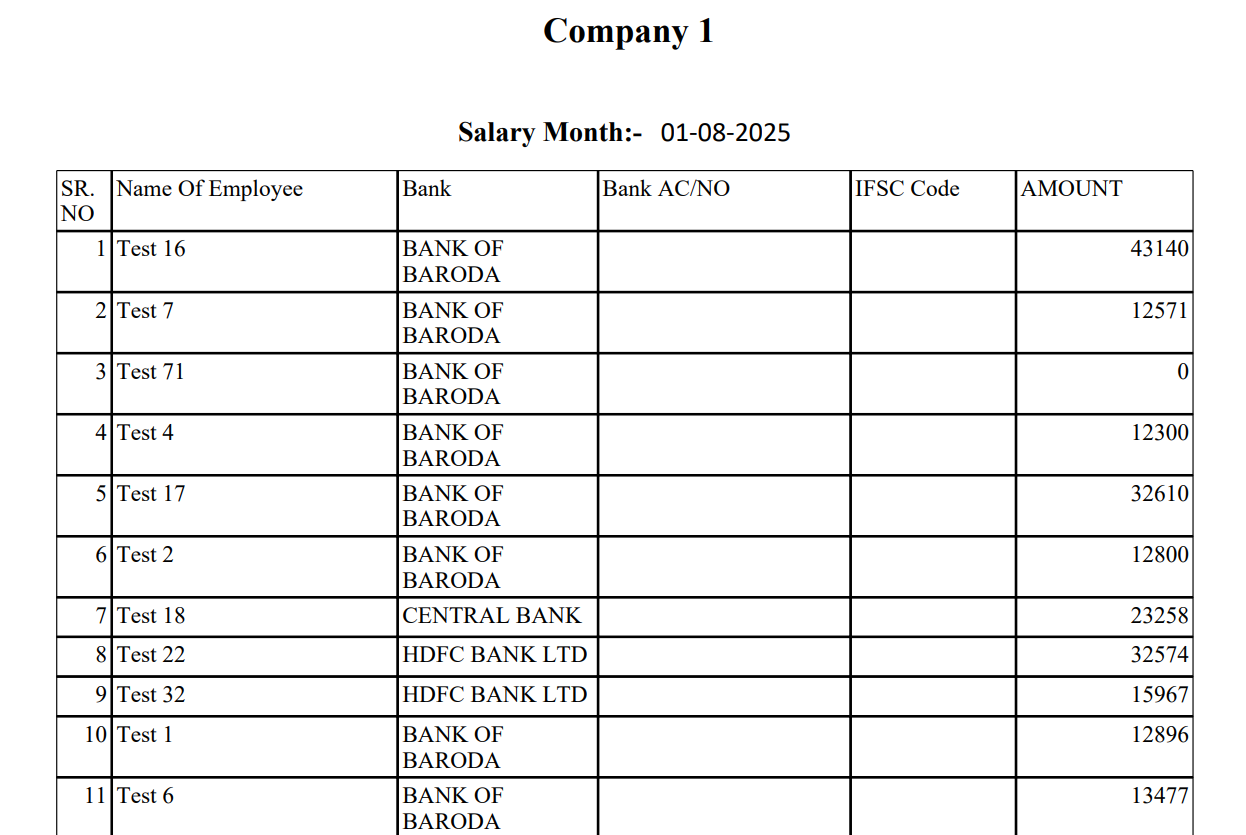
Figure 3.0: Bank Statement Example
4 Department Wise Summary Report
This report provides a summary of payroll costs categorized by department. It helps management analyze salary distribution across different operational units.
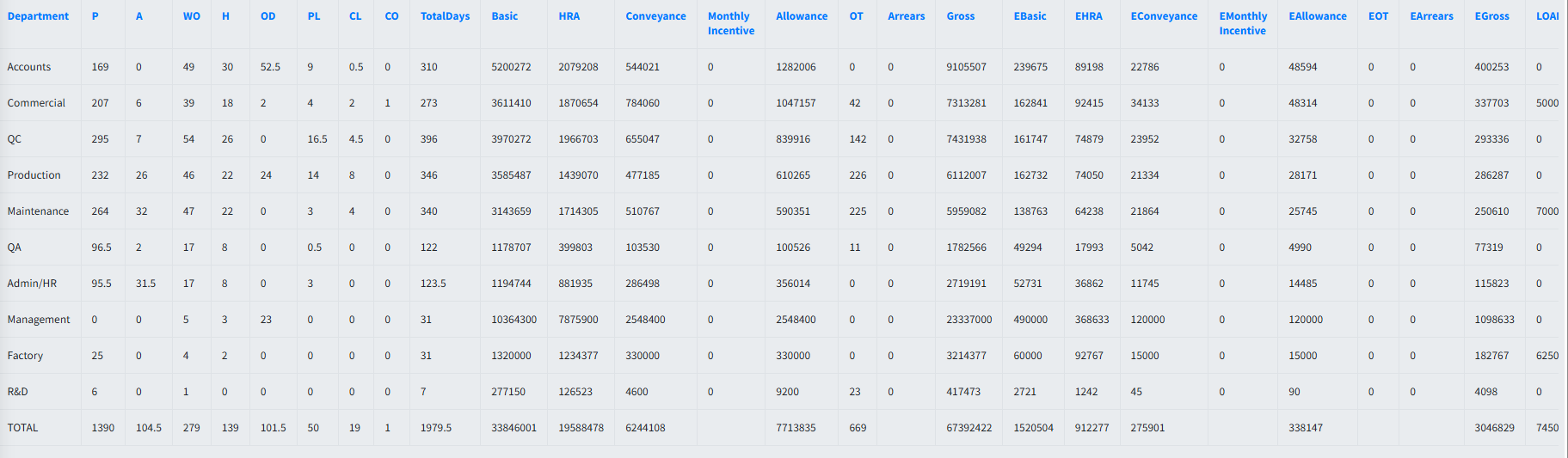
Figure 4.0: Department Wise Summary Report Example
5 Designation Wise Summary Report
This report provides a summary of payroll costs categorized by designation. It helps management analyze salary distribution across different operational units.
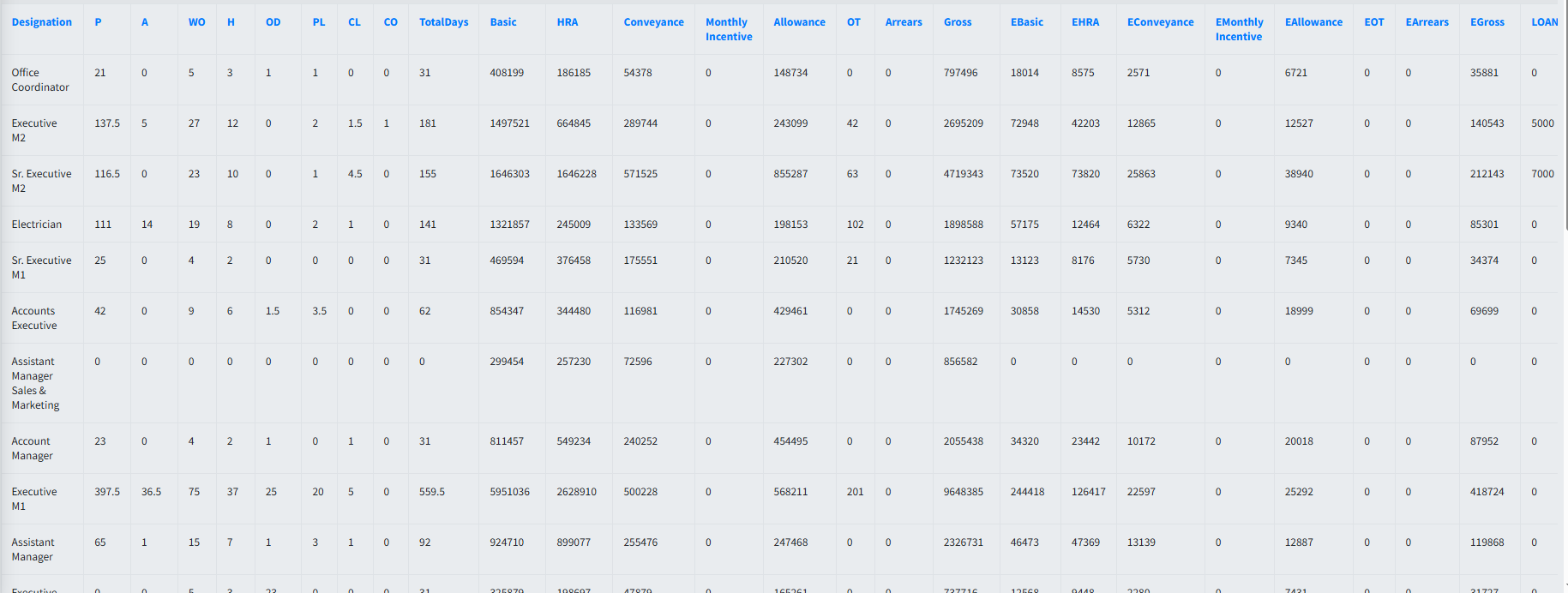
Figure 5.0: Designation Wise Summary Report Example
6 Cost Center Wise Summary Report
This report provides a summary of payroll costs categorized by cost center. It helps management analyze salary distribution across different operational units.

Figure 6.0: Cost Center Wise Summary Report Example
This section details the Canteen Reports available in the HRMex system. These reports help track meal consumption, canteen usage, and food service efficiency.
1 Canteen Daily Report
The Canteen Daily Report provides a daily breakdown of meal consumption. It helps in tracking daily food usage and managing canteen resources effectively.
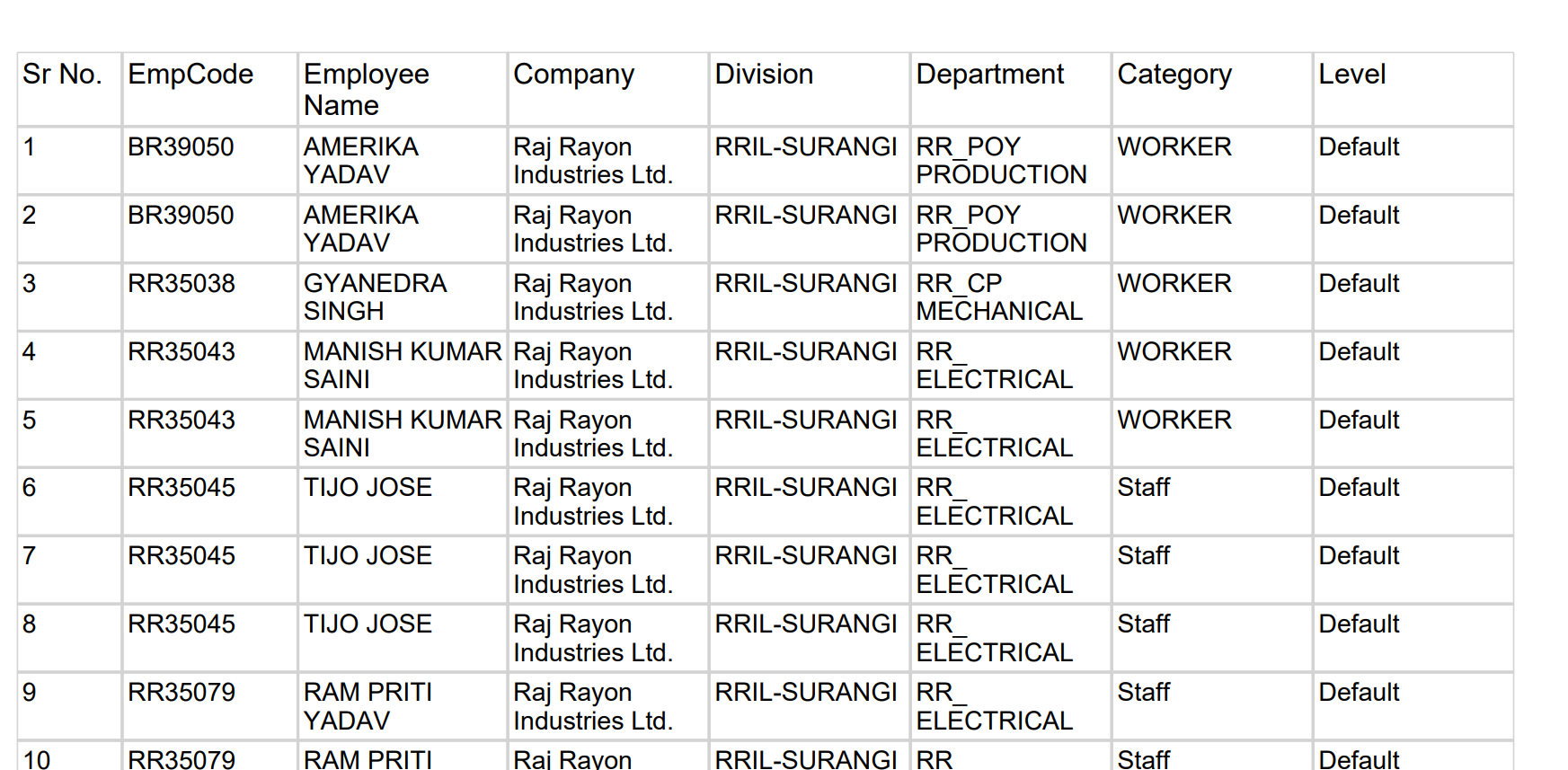
Figure 1.0: Canteen Daily Report Example
2 Canteen Detail Report
The Canteen Detail Report offers a detailed view of canteen transactions. It includes employee-wise meal details, helping to audit usage and billing.
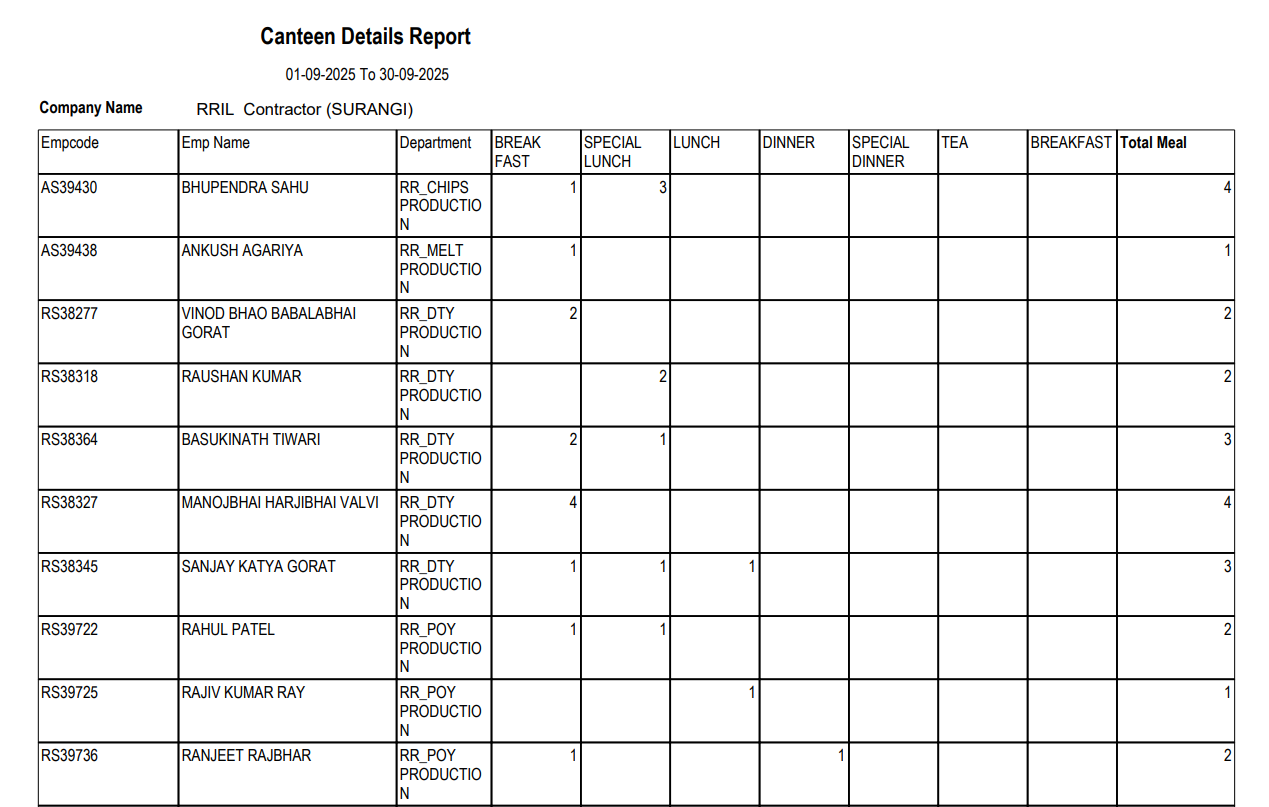
Figure 2.0: Canteen Detail Report Example
3 Canteen Monthly Report
The Canteen Monthly Report summarizes canteen usage over the entire month. It is essential for monthly billing, cost analysis, and trend monitoring.
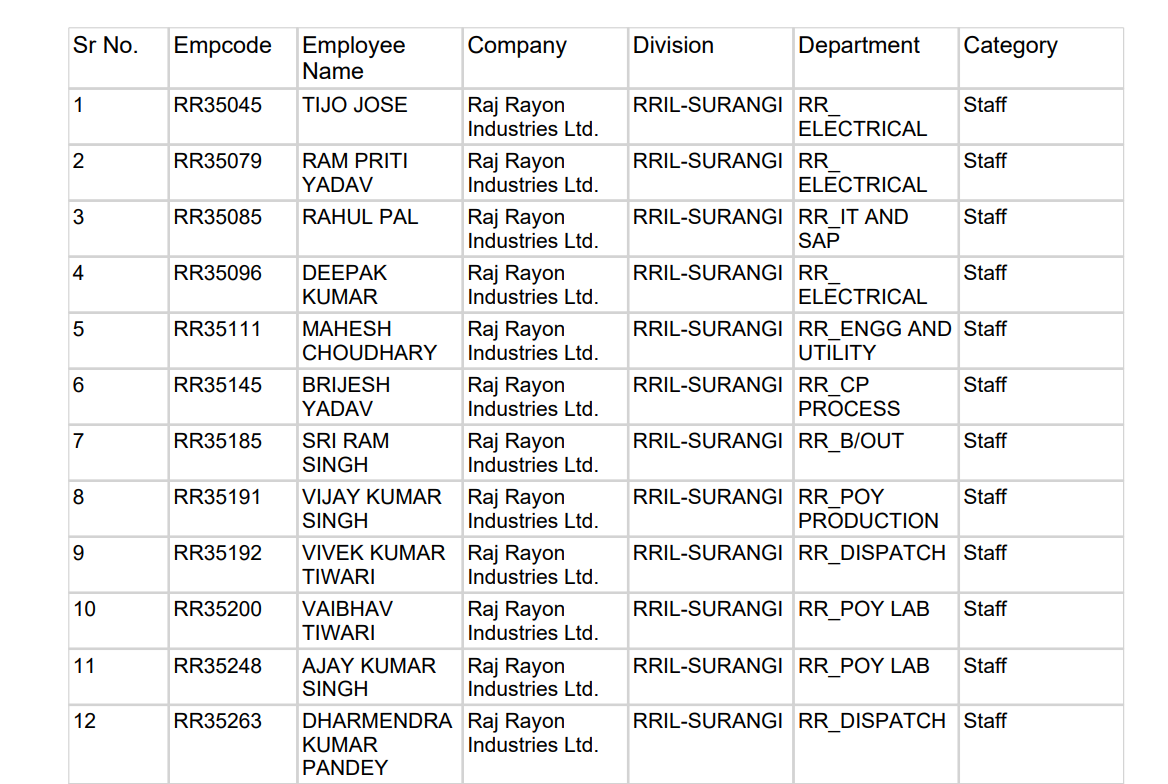
Figure 3.0: Canteen Monthly Report Example
1 VMS Report
The Visitor Management System (VMS) Report offers a comprehensive overview of all daily visitor activities. It logs crucial details such as Gate Pass number, visitor name, company, meeting purpose, employee visited, department, check-in time, check-out time, and total stay duration. This report strengthens security monitoring, supports compliance requirements, and ensures transparent visitor tracking across the organization. With accurate digital records, businesses can streamline audits, enhance workplace safety, and maintain complete control over visitor movement.
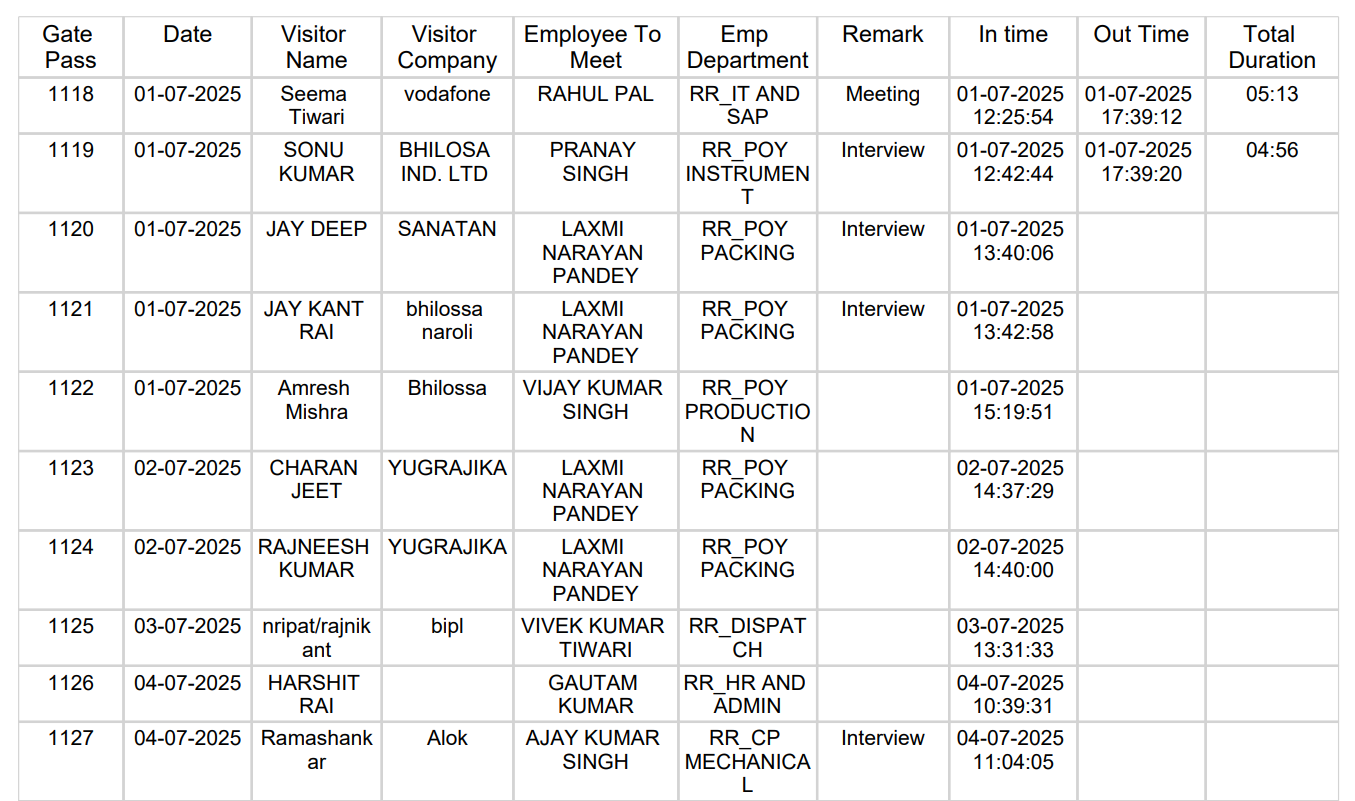
Figure 1.0: VMS Report Example
The Management Information System (MIS) Reports provide high-level insights and analytics for strategic decision-making. These reports help management track key performance indicators and operational efficiency.
1 Head Count Report
The Head Count Report provides a snapshot of the total workforce strength. It categorizes employees by department, designation, or location, helping in workforce planning.
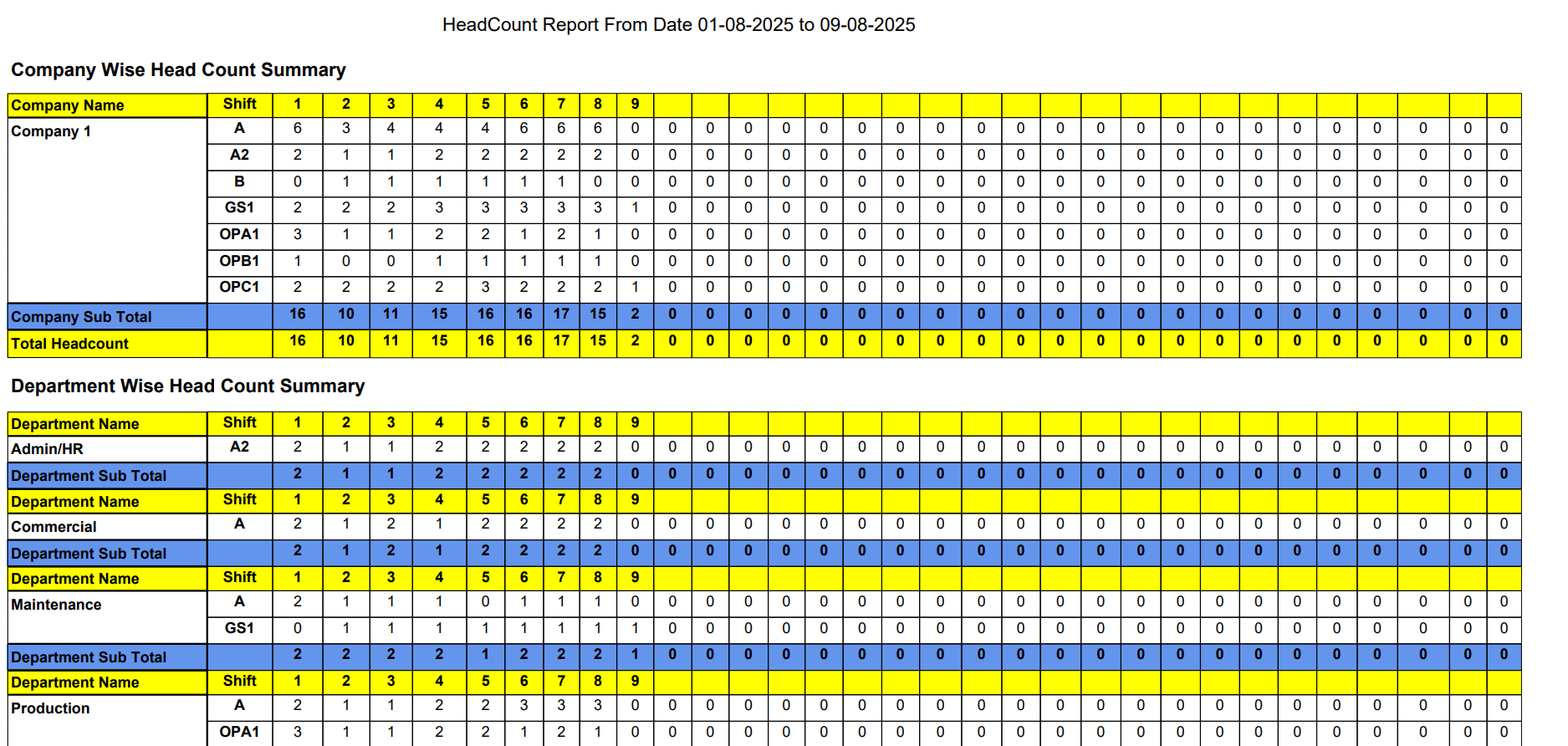
Figure 1.0: Head Count Report Example
2 Monthly Loss Report
This report highlights potential losses due to absenteeism, late arrivals, or idle time. It is crucial for identifying areas where productivity can be improved.

Figure 2.0: Monthly Loss Report Example
The Overtime (OT) Reports section tracks extra hours worked by employees. These reports are vital for calculating overtime payments and ensuring compliance with labor laws.
1 OT Report
The standard OT Report details the daily overtime hours for each employee. It helps supervisors verify and approve overtime claims.
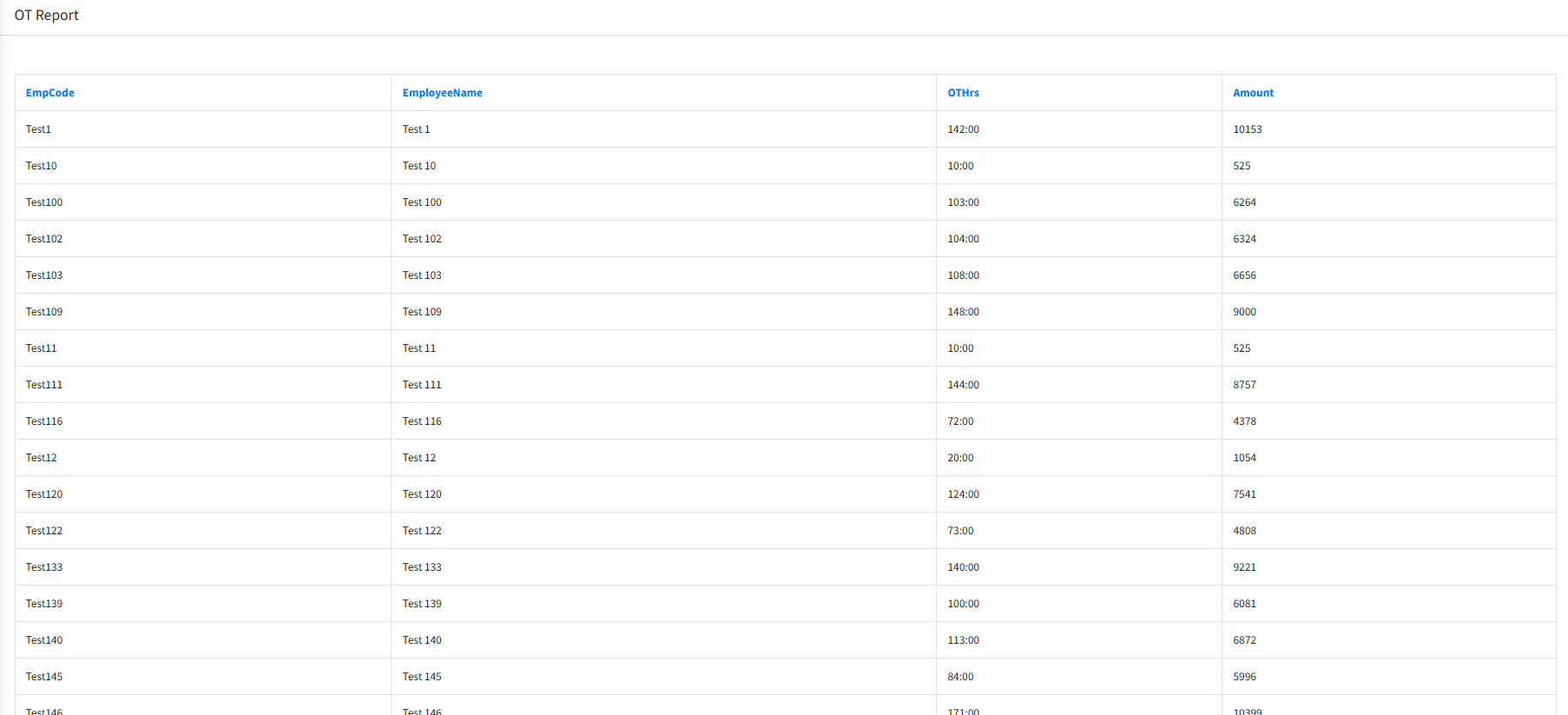
Figure 1.0: OT Report Example
2 OT Bank Statement Report
This report is generated for processing overtime payments via bank transfer. It lists the OT amount payable to each employee along with their bank details.
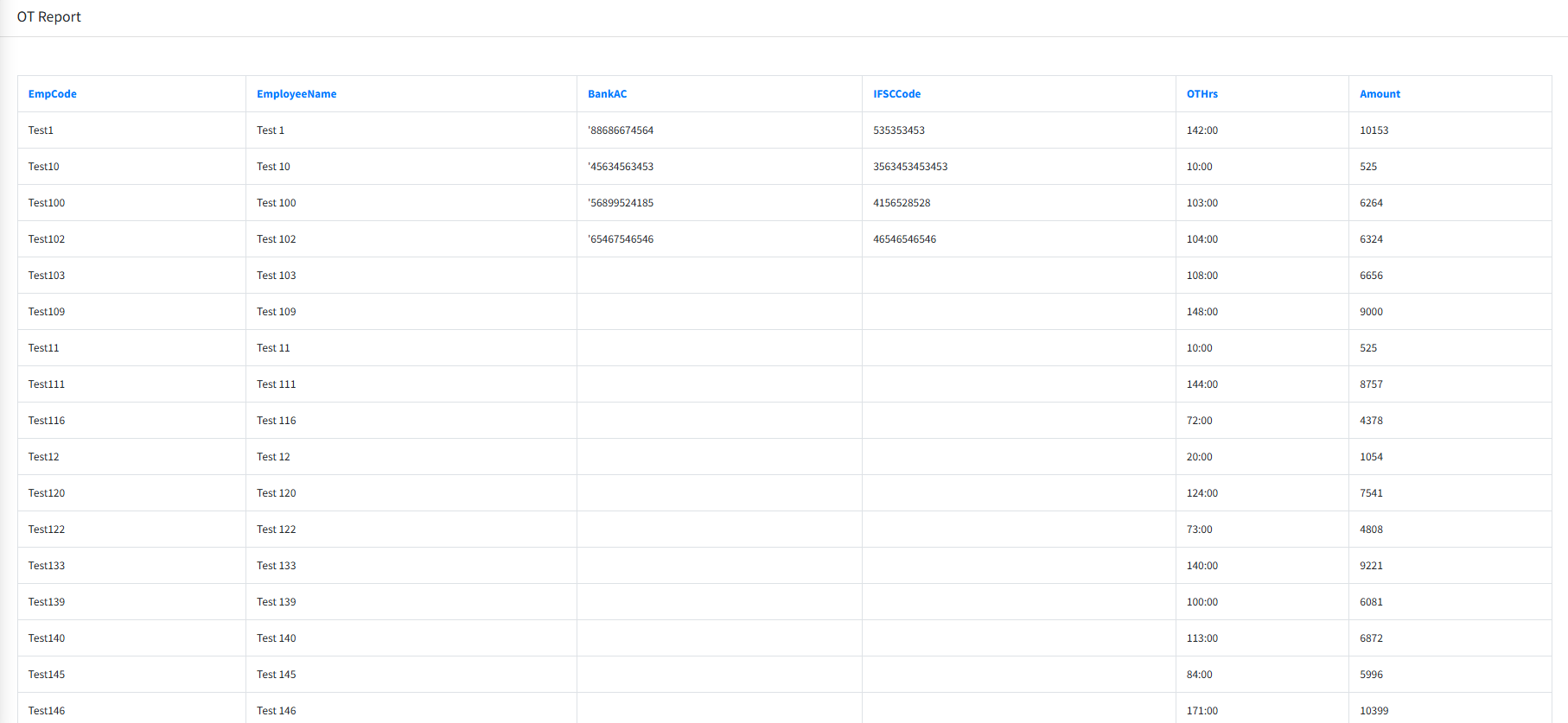
Figure 2.0: OT Bank Statement Report Example